INSTRUCTIONS: Multi-player compatibility
 Posted: Thu Oct 02, 2008 3:09 pm
it seems that the way in which the multi-player functions in FSX differes from previous versions, particularly FS9. after much messing about (not by me i hasten to add!) there is a solution 
for all FSX users, here's how I made multi-player work with FS9 users:
1) download and install FSHostClient - http://www.chocolatesoftware.com/fshost/
2) start FSX and select "Free Flight" - NOT MULTI-PLAYER
3) select a/c etc as usual
4) start FSHostClient
5) enter your username in the appropriate box (it doesn't have to be the same name as you've registered for GameSpy - it can be anything!)
6) enter the server IP address 64.46.45.195 into the appropriate box (the other IP address doesn't seem to work)
you should now see a session(s) in progress - click that session and select "connect" (i think - doing this from memory! )
that should show you a list of all players connected to that server and session, and (if you are all in the same place!) you should be able to see each others' a/c as in FSX lobby sessions.
hurrah! F-L-Y!!!
a little thing that i found very useful: using the chat box might pause FS (although the chatbox seems to always stay on top of any other window) this doesn't pause THE GAME - just YOU!!!
to make things easier, i went into "options", "settings...", "general..." and unchecked the "Pause on task switch" box; this means that you can type and fly at the same time (i bet even DT doesn't do that! )
)
one thing to watch though: after typing a message and hitting 'return' to send, FS becomes the active window again automatically - i.e if you try and type another message beginning with "G" for example, you lower your u/c instead!
chatbox as the inactive window, but still on top (the area in which you type is just out of shot below)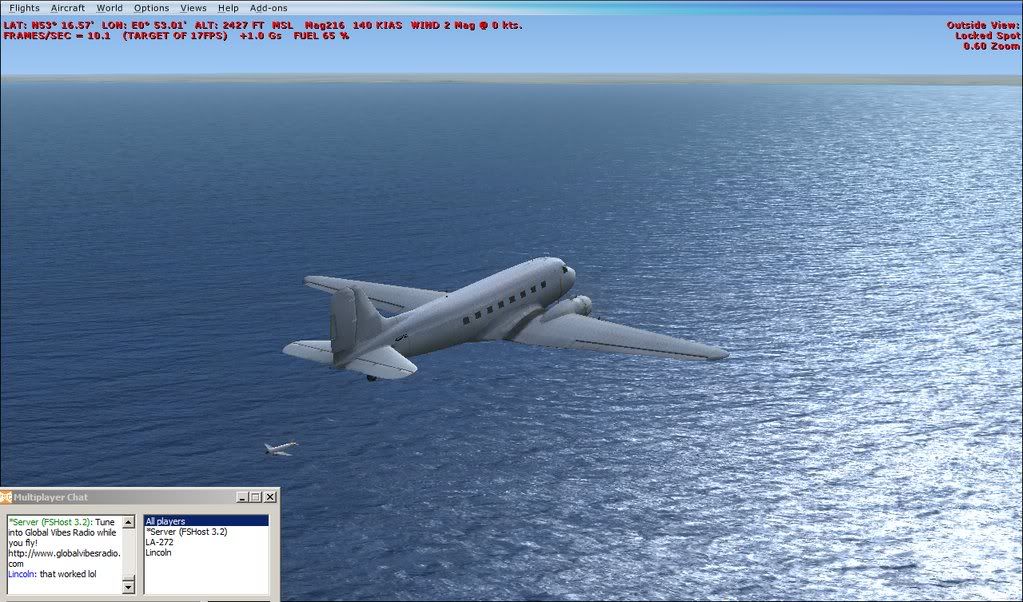
you have to click in the chatbox again (to make it the active window again) to type another message. FS will continue (on mute) in the background, until you press send/return again.
also,there are some useful features that I've found too; within the chatbox,right-click on another player's name and you can go straight to their location!
it would also appear that you can still use most (if not all) of the features/options available in a normal FSX Free Flight, which are not usually available in FSX multi-player - such as "go to airport..." - "map..." - "fuel..." - "instant replay/video clip" - etc etc...
the only thing that this method of multi-player doesn't seem to do the same as in FSX is the labels over the other players' a/c - it gives a/c make/type - distance and altitude,but DOESN'T show the players' names
otherwise, it seems to work just fine - AT LAST!!!!!!!
sm
for all FSX users, here's how I made multi-player work with FS9 users:
1) download and install FSHostClient - http://www.chocolatesoftware.com/fshost/
2) start FSX and select "Free Flight" - NOT MULTI-PLAYER
3) select a/c etc as usual
4) start FSHostClient
5) enter your username in the appropriate box (it doesn't have to be the same name as you've registered for GameSpy - it can be anything!)
6) enter the server IP address 64.46.45.195 into the appropriate box (the other IP address doesn't seem to work)
you should now see a session(s) in progress - click that session and select "connect" (i think - doing this from memory! )
that should show you a list of all players connected to that server and session, and (if you are all in the same place!) you should be able to see each others' a/c as in FSX lobby sessions.
hurrah! F-L-Y!!!
a little thing that i found very useful: using the chat box might pause FS (although the chatbox seems to always stay on top of any other window) this doesn't pause THE GAME - just YOU!!!
to make things easier, i went into "options", "settings...", "general..." and unchecked the "Pause on task switch" box; this means that you can type and fly at the same time (i bet even DT doesn't do that!
)one thing to watch though: after typing a message and hitting 'return' to send, FS becomes the active window again automatically - i.e if you try and type another message beginning with "G" for example, you lower your u/c instead!
chatbox as the inactive window, but still on top (the area in which you type is just out of shot below)
you have to click in the chatbox again (to make it the active window again) to type another message. FS will continue (on mute) in the background, until you press send/return again.
also,there are some useful features that I've found too; within the chatbox,right-click on another player's name and you can go straight to their location!
it would also appear that you can still use most (if not all) of the features/options available in a normal FSX Free Flight, which are not usually available in FSX multi-player - such as "go to airport..." - "map..." - "fuel..." - "instant replay/video clip" - etc etc...
the only thing that this method of multi-player doesn't seem to do the same as in FSX is the labels over the other players' a/c - it gives a/c make/type - distance and altitude,but DOESN'T show the players' names
otherwise, it seems to work just fine - AT LAST!!!!!!!
sm


